
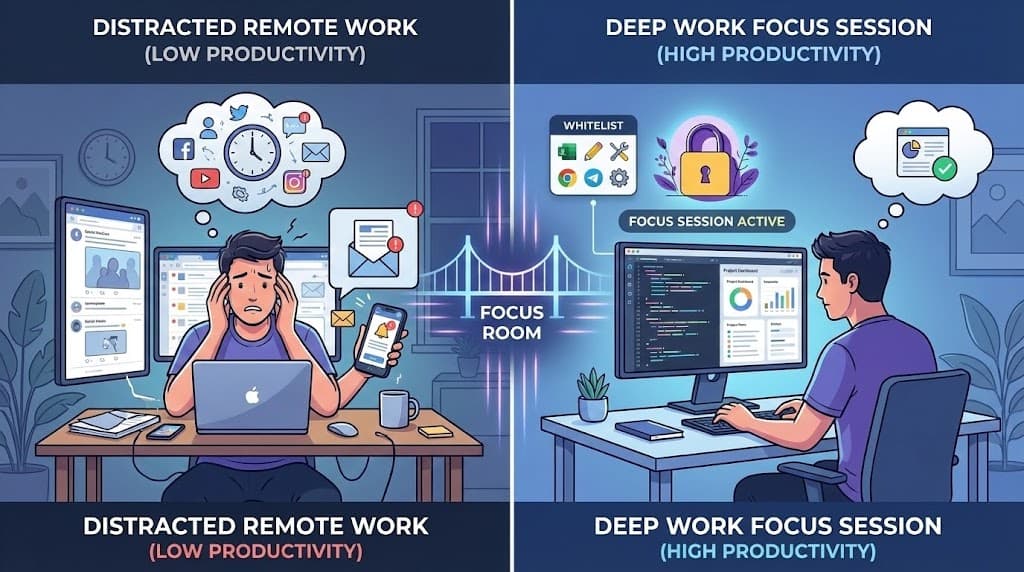
Remote work offers incredible flexibility—but it also comes with a hidden cost: constant distractions. Your team members are sitting at home with Slack notifications, social media, personal errands, and Netflix just one click away.
The result? Shallow work. Context-switching. Missed deadlines. And that feeling of being "busy all day" without actually accomplishing anything meaningful.
But there's a solution that high-performing remote teams are adopting: focus sessions—structured blocks of distraction-free time where everyone commits to deep work together.
The Remote Work Distraction Problem
Let's face it: working from home is hard.
A study by RescueTime found that the average knowledge worker spends just 2 hours and 48 minutes on productive tasks per day. The rest? Meetings, emails, Slack, and—let's be honest—distractions.
Remote workers face unique challenges:
- No physical separation between work and personal life
- Always-on communication tools creating constant interruptions
- Lack of social accountability (no one sees you browsing Reddit)
- Zoom fatigue making it hard to stay engaged during virtual collaboration
The cost is real. Teams miss deadlines. Quality suffers. And employees burn out from feeling like they're working all the time without getting anything done.
What Are Focus Sprints?
A focus sprint (sometimes called a "focus session" or "deep work block") is a structured period where team members commit to working on a single task without distractions.
Think of it like a virtual "do not disturb" mode—but with accountability built in.
Here's how it typically works:
- Set a duration: Usually 60-90 minutes (the optimal range for deep focus)
- Define the task: Everyone knows what they're working on
- Block distractions: Only work-related sites and tools are accessible
- Work together: Even if async, knowing others are focused creates accountability
- Debrief: Quick check-in after the session to share progress
The key difference from just "working quietly" is the commitment and structure. When your whole team agrees to focus together, there's social pressure to actually do it.
How to Run a Focus Session for Your Team
Ready to try focus sprints with your remote team? Here's a step-by-step guide:
Step 1: Schedule the Session
Pick a time that works across time zones. Many teams find these slots effective:
- Morning focus block: 9-11 AM (before meetings pile up)
- Afternoon deep work: 2-4 PM (after lunch, before end-of-day wrap-up)
- Maker schedule days: Designate Tuesday/Thursday as "no meeting" focus days
Send a calendar invite with clear expectations: cameras off, Slack paused, phones away.
Step 2: Create Your Focus Room
Use a tool like Focus Room to create a dedicated session:
- Create a new room with a clear name (e.g., "Q4 Planning Sprint")
- Set up your whitelist of allowed sites (more on this below)
- Share the room code with your team
- Have everyone join via the browser extension
The whitelist approach means team members can only access work-related sites during the session—no willpower required.
Step 3: Define What's Allowed
This is where focus sessions get powerful. Instead of relying on self-discipline, you define the boundaries upfront:
For a coding sprint:
- GitHub, GitLab, Bitbucket
- VS Code Web, CodeSandbox, Replit
- Stack Overflow, MDN, official documentation
- Your project management tool (Jira, Linear, Asana)
For a writing session:
- Google Docs, Notion, your CMS
- Research sources you've already identified
- Grammarly, Hemingway Editor
For a design sprint:
- Figma, Sketch, Adobe Creative Cloud
- Dribbble, Behance (for reference only)
- Your design system documentation
The key is being intentional. If a site isn't essential to the task, it's not on the whitelist.
Step 4: Run the Session
Once everyone's joined:
- Quick kickoff (2 min): State the goal. "In the next 90 minutes, we're shipping the login feature."
- Focus time (60-90 min): Heads down, no interruptions. If someone needs help, they wait until the break.
- Midpoint check (optional): A 5-minute stretch break at the halfway mark.
- Wrap-up (5 min): Quick async update in Slack: "Here's what I accomplished."
Step 5: Review and Iterate
After a few sessions, review what's working:
- Are the whitelists too restrictive? Too permissive?
- Is the timing optimal for your team?
- Are people actually feeling more productive?
Adjust based on feedback. Focus sessions should feel empowering, not restrictive.
Whitelist Strategies for Different Work Types
One of the most common questions teams have is: "What should we allow?"
Here are battle-tested whitelist templates:
Software Development
github.com, gitlab.com, bitbucket.org
stackoverflow.com, developer.mozilla.org
docs.*.com (official documentation)
localhost:* (local development)
Your CI/CD platform
Your project management tool
Content & Marketing
docs.google.com, notion.so
Your CMS (WordPress, Webflow, etc.)
canva.com (for graphics)
grammarly.com
Your analytics dashboard
Design & Creative
figma.com, sketch.com
adobe.com (Creative Cloud)
dribbble.com, behance.net (reference only)
fonts.google.com, fontawesome.com
Your design system documentation
Research & Analysis
Your data tools (Tableau, Looker, etc.)
Google Sheets, Excel Online
Academic databases (if applicable)
Industry-specific resources
Pro tip: Start restrictive, then add sites as needed. It's easier to expand the whitelist than to remove distractions you've already allowed.
Building Trust: Focus Monitoring vs. Micromanagement
Let's address the elephant in the room: "Isn't this just surveillance?"
It's a fair question. And the answer depends entirely on how you implement it.
Micromanagement looks like:
- Forcing focus sessions on unwilling team members
- Using violation data to punish employees
- Monitoring every minute of the workday
- No transparency about what's being tracked
Healthy focus sessions look like:
- Opt-in participation: Team members choose to join
- Transparency: Everyone knows what's tracked (and what isn't)
- Team-focused goals: "Let's ship this together" vs. "I'm watching you"
- Time-boxed: 1-2 hours of focus, not 8 hours of surveillance
- Results-oriented: Did we ship the feature? That's what matters.
The goal isn't to catch people slacking—it's to create an environment where focus is the default.
When implemented well, team members often request focus sessions. They appreciate the structured time to get real work done without interruptions.
Tools That Help
Several tools support remote team focus sessions:
Focus Room - Create whitelist-based focus rooms where team members can only access approved sites. Real-time monitoring shows who's focused and flags any off-task browsing. Perfect for teams that want structure without heavy-handed surveillance.
Focusmate - Virtual coworking with strangers. Good for individual accountability, but less control over what's allowed.
Forest - Gamified focus timer that "grows trees" when you stay focused. Fun for individuals, but no team features.
Slack/Teams "Do Not Disturb" - Pause notifications during focus time. Helpful, but relies on self-discipline.
The right tool depends on your team's needs. If you want whitelist control and team coordination, Focus Room is purpose-built for that use case.
Getting Started: Your Focus Session Checklist
Ready to run your first focus sprint? Here's a quick checklist:
Before the session:
- Schedule 60-90 minutes on the team calendar
- Create a Focus Room with your whitelist
- Share the room code with participants
- Define the goal (what will you accomplish?)
During the session:
- Everyone joins the room via browser extension
- Quick 2-minute kickoff to state the goal
- Heads down, deep work
- Optional: 5-minute midpoint break
After the session:
- Quick async update: "Here's what I shipped"
- Review any violations (without blame)
- Iterate on the whitelist for next time
Start Small, Scale Up
You don't need to transform your entire team overnight.
Start with one focus session per week. Pick your most distraction-prone task—the one that always seems to take longer than it should. Run a 60-minute focus sprint on it.
See how it goes. Get feedback. Adjust.
Once the team sees the results—shipped features, completed projects, reduced stress—they'll ask for more focus time.
Deep work isn't about working harder. It's about working smarter—with intention, structure, and the right tools to make focus the default.
Ready to try focus sessions with your remote team?
Sign up for Focus Room and create your first focus room in minutes. It's free to get started.
Questions or feedback? Email us: [email protected]
— The Focus Room Team