
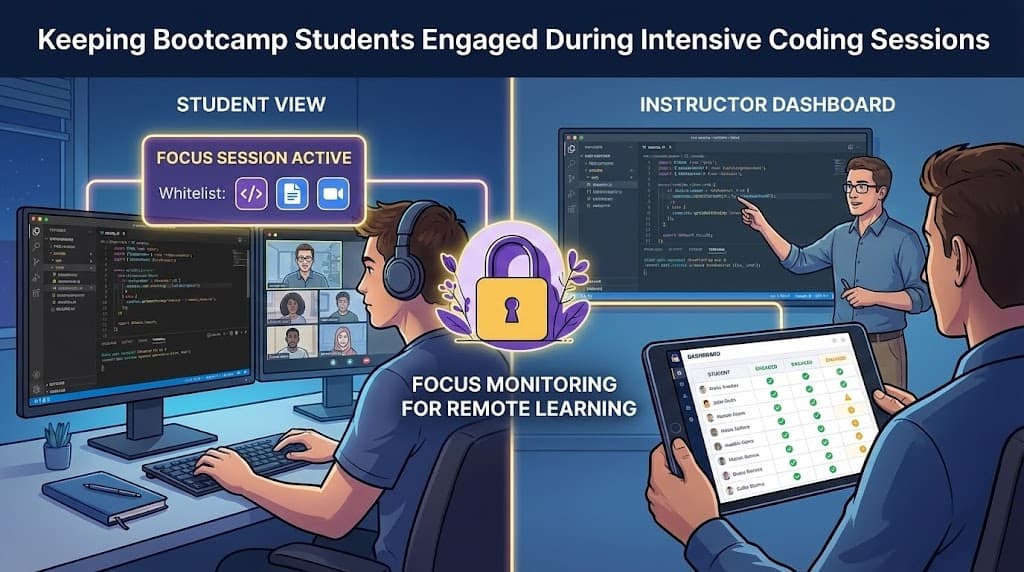
Running a coding bootcamp is already challenging. Now add remote learning to the mix, and you've got a recipe for disengagement.
Students are sitting at home, staring at a Zoom call, following along with a live coding session. Meanwhile, their browser has 20 tabs open—including Twitter, YouTube, and that one Reddit thread they've been meaning to read.
By the time you ask, "Any questions about that function?", half the cohort has no idea what you just built.
Sound familiar? Here's how bootcamp instructors are solving this problem with focus monitoring.
The Bootcamp Engagement Challenge
Coding bootcamps demand intense focus. You're learning an entire career's worth of skills in 12-16 weeks. Every session matters.
But remote bootcamps face unique challenges:
Zoom fatigue is real After hours of screen time, attention wanders. Students start checking their phones, browsing other tabs, or just zoning out.
Self-paced doesn't mean self-motivated Many students struggle with the independence of remote learning. Without the structure of a physical classroom, distractions take over.
It's hard to tell who's falling behind In person, you can see confused faces. Online, students mute their cameras and silently struggle—or silently browse Instagram.
The stakes are high Bootcamp students are often making career changes. They've invested significant money and time. When they disengage and fall behind, the consequences are serious.
Why Coding Sessions Are Different
Here's the good news: coding sessions are uniquely suited to whitelist-based focus monitoring.
Unlike generic office work, coding has a clear set of tools:
- Your IDE or code editor (VS Code, WebStorm, cloud IDEs)
- Version control (GitHub, GitLab)
- Documentation (MDN, official docs)
- The video conferencing platform
- Maybe Stack Overflow for reference
That's it. You don't need access to social media, news sites, or streaming platforms to learn React.
This makes creating a whitelist straightforward: allow only the tools students need, block everything else.
Setting Up Whitelists for Coding Environments
Here's a practical whitelist for a typical web development bootcamp session:
Essential Development Tools
github.com
gitlab.com
codepen.io
codesandbox.io
replit.com
stackblitz.com
Documentation & References
developer.mozilla.org (MDN)
docs.*.dev (official framework docs)
react.dev
nodejs.org/docs
w3schools.com
Your Bootcamp's Tools
Your LMS (Canvas, Teachable, etc.)
zoom.us or meet.google.com
Your cohort's Slack workspace
Optional (Instructor Discretion)
stackoverflow.com (helpful but can be a rabbit hole)
css-tricks.com
freecodecamp.org
What to Block (by default)
Everything else—especially:
- Social media (Twitter, Instagram, Reddit, TikTok)
- Video streaming (YouTube, Netflix, Twitch)
- News and entertainment sites
- AI coding assistants (if you want students to struggle productively first)
Pro tip: Some instructors allow YouTube but only for sessions where students are following a specific tutorial video. Use your judgment based on the lesson plan.
Tracking When Students Fall Behind
One of the most valuable aspects of focus monitoring isn't catching "cheaters"—it's identifying students who need help.
When a student starts browsing off-task, it's often a signal:
- They're confused and giving up
- They're finished early and bored
- They're overwhelmed and avoiding the work
Instead of viewing violations as something to punish, use them as diagnostic data:
Pattern: Student accesses off-task sites during exercises → Possible cause: They don't understand the concept well enough to apply it → Action: Check in privately during the break, offer extra help
Pattern: Student finishes early and browses → Possible cause: They need more challenging material → Action: Have stretch goals ready for fast learners
Pattern: Student is off-task from the start → Possible cause: Life circumstances, burnout, or disengagement → Action: One-on-one conversation about what's going on
This reframes focus monitoring from "surveillance" to "early warning system" for student success.
Live Coding Workshops: Keeping Everyone on the Same Page
Live coding is the backbone of most bootcamps. You're building something in real-time, and students are following along.
But here's the problem: if a student misses one step, they're lost for the rest of the session.
Focus monitoring helps in several ways:
Real-Time Visibility
When you see a violation alert, you know someone just disengaged. You can:
- Pause and ask if anyone needs clarification
- Re-explain the last step
- Share your screen with annotations highlighting key concepts
Pacing Checks
At natural breakpoints, check the focus dashboard. If 30% of students have been off-task in the last 5 minutes, you might be going too fast—or the concept needs more explanation.
Post-Session Review
After the workshop, review the violation timeline:
- Which parts caused the most disengagement?
- Were there specific moments where multiple students went off-task?
- Use this data to improve future lesson plans
Hackathon Use Case
Hackathons are another perfect use case for focus sessions—but with a twist.
During a hackathon, you want students to:
- Stay focused on building
- Use legitimate resources (docs, tutorials)
- NOT copy-paste entire solutions from AI or code sharing sites
A hackathon whitelist might look like:
# Development tools (broad access)
github.com, gitlab.com, bitbucket.org
*.dev (documentation sites)
stackoverflow.com (reference, not copying)
npmjs.com, pypi.org (package registries)

# Blocked
chatgpt.com, claude.ai (or allow for specific challenges)
chegg.com, coursehero.com
Direct code solution sites
The goal isn't to prevent all help—it's to ensure students are building their own solutions with legitimate reference materials.
Hackathon tip: Consider allowing AI tools for specific challenges (like "use AI to help debug") while blocking them for core building challenges. Your whitelist can change throughout the event.
Building a Culture of Focus (Not Surveillance)
Here's the truth: focus monitoring only works if students buy in.
If it feels like surveillance, students will resent it. If it feels like support, they'll appreciate it.
Here's how to frame it:
Be Transparent
Explain exactly what's being monitored (site access) and what isn't (webcam, keystrokes). Share the whitelist so students know what's allowed.
Explain the Why
"We're all here to learn. Distractions make that harder. This tool helps us all stay focused—including me."
Make It Collective
Everyone joins the focus room—instructors included. It's a team commitment, not top-down surveillance.
Don't Weaponize Violations
Use violation data to help students, not punish them. If someone struggled to stay focused, that's a conversation—not a mark on their record.
Celebrate Focus Wins
"Great session, everyone! 95% focus rate during the live coding portion. That's why we shipped so much today."
Tools for Bootcamp Instructors
Several tools can help manage focus during remote bootcamp sessions:
Focus Room - Create whitelist-based focus sessions where students can only access approved sites. Real-time monitoring lets you see who's engaged and who might need help. Perfect for live coding workshops and assessments.
Screen sharing tools - Zoom/Meet screen sharing helps students follow along, but doesn't address what they're doing on their own screens.
VS Code Live Share - Great for collaborative coding, but doesn't help with attention during lecture portions.
Attention tracking in Zoom - Limited and controversial. Only shows if Zoom is in focus—not what students are actually doing.
For bootcamps specifically, the combination of whitelist control + real-time visibility makes Focus Room particularly effective.
Getting Started Checklist
Ready to try focus sessions with your bootcamp? Here's a quick start guide:
Before the cohort starts:
- Set up your Focus Room account
- Create whitelist templates for different session types (lectures, exercises, assessments)
- Add instructions to your student onboarding materials
- Explain the tool and its purpose during orientation
For each session:
- Create a focus room with the appropriate whitelist
- Share the room code at the start of class
- Monitor engagement during live coding portions
- Check in with students who show signs of disengagement
After each session:
- Review violation patterns
- Identify students who might need extra support
- Adjust whitelists if something legitimate was blocked
Weekly:
- Share focus metrics with the cohort (celebrate wins!)
- Have 1:1s with consistently disengaged students
- Refine your whitelist templates based on what's working
The Bottom Line
Running a remote coding bootcamp is hard. Students are paying thousands of dollars and trusting you to help them change careers. They deserve an environment that supports focus and learning.
Focus monitoring isn't about catching students being "bad." It's about:
- Creating structure in an unstructured environment
- Identifying who needs help before they fall too far behind
- Building a culture where focus is the norm, not the exception
Your students will thank you—even if they grumble about it at first.
Ready to improve engagement in your coding bootcamp?
Sign up for Focus Room and set up your first focus session. It's free to get started.
Questions about bootcamp-specific use cases? Email us: [email protected]
— The Focus Room Team