
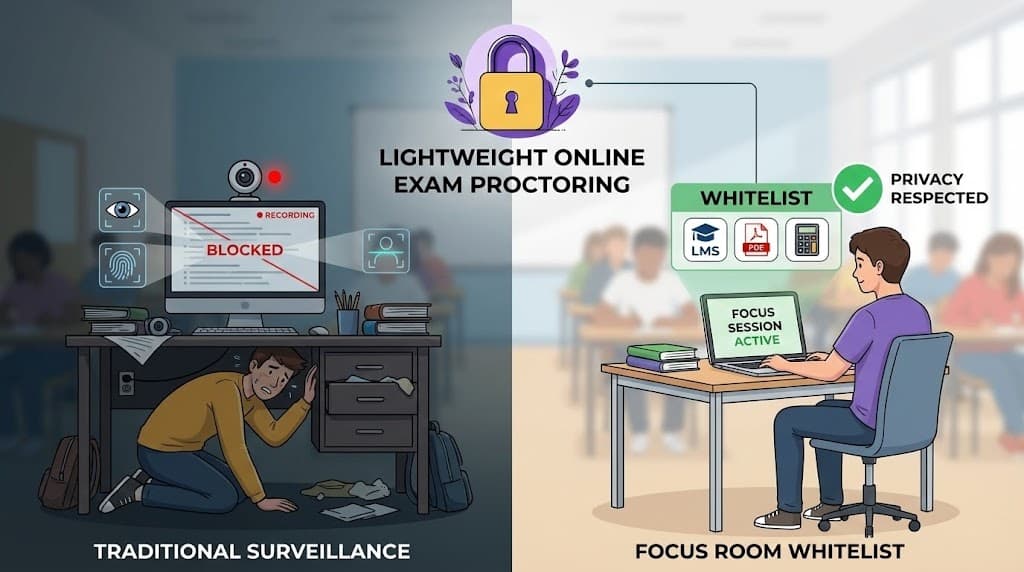
Online exams are here to stay. Whether you're a university professor, certification provider, or corporate trainer, you've likely faced the challenge of maintaining exam integrity in a remote setting.
The traditional solution? Heavy-duty proctoring software that monitors webcams, tracks eye movements, flags "suspicious" behavior, and records every keystroke.
But there's growing pushback against these invasive tools—from students, employees, and privacy advocates alike. And for good reason.
There's a better way: lightweight, whitelist-based proctoring that ensures integrity without turning every exam into a surveillance operation.
The Problem with Traditional Proctoring Software
Let's be direct: most proctoring software is designed to treat test-takers as potential cheaters from the start. Here's what they typically do:
Webcam monitoring: Your face is recorded throughout the exam. Some tools use AI to flag "suspicious" eye movements or facial expressions.
Browser lockdown: You're forced into a proprietary browser that blocks everything—including legitimate resources for open-book exams.
Biometric tracking: Some tools analyze keystroke patterns, mouse movements, and even voice to verify identity.
Room scanning: Before the exam, you may need to show your entire room via webcam to prove no one else is present.
Flagging algorithms: AI flags behaviors like looking away from the screen, having someone walk behind you, or even your eyes moving "too much."
Why This Is a Problem
False positives: Students with ADHD, anxiety, or physical disabilities often get flagged for "suspicious" behavior that's actually just... being human.
Privacy invasion: Recording someone's bedroom or home office raises serious privacy concerns. Some tools even require exam-takers to remove personal items from view.
Technical barriers: These tools often require specific browsers, operating systems, or hardware—excluding people with older devices or accessibility needs.
Stress and anxiety: Knowing you're being watched, recorded, and analyzed by AI makes test anxiety worse, often hurting performance.
Trust erosion: Starting from a position of "we assume you'll cheat" damages the relationship between institutions and test-takers.
Whitelist-Based Proctoring: A Different Approach
What if instead of recording everything and flagging "suspicious" behavior, we just... controlled what resources are accessible?
That's the core idea behind whitelist-based proctoring.
Here's how it works:
- Define allowed resources: The exam administrator creates a whitelist of websites and tools permitted during the exam
- Participants install a lightweight extension: No browser lockdown, no webcam—just a browser extension that monitors which sites are accessed
- Real-time visibility: Administrators see if anyone accesses non-whitelisted sites
- Violations are logged: Any off-whitelist browsing is flagged for review—but without invasive recordings
What This Approach Gets Right
Appropriate to the exam type: Open-book exam? Allow reference materials. Closed-book? Restrict to just the exam platform.
Respects privacy: No webcam. No room scanning. No biometric tracking. Just site access monitoring.
Lower technical barrier: Works in any browser with a lightweight extension. No special hardware required.
Transparent: Test-takers know exactly what's being monitored (site access) and what isn't (webcam, keystrokes, etc.).
Focuses on behavior, not appearance: We care whether you accessed ChatGPT, not whether you looked to the left for 3 seconds.
When Lightweight Proctoring Works Best
Let's be honest: whitelist-based proctoring isn't right for every scenario. Here's where it shines—and where it doesn't.
Ideal Use Cases
Open-book exams and assessments When test-takers are allowed to use certain references (textbooks, documentation, notes), a whitelist ensures they stick to approved resources without blocking legitimate tools.
Certification prep and practice tests For low-stakes practice exams where the goal is learning (not gatekeeping), lightweight monitoring provides accountability without the stress of heavy surveillance.
Professional certifications with defined resources Many professional certifications allow access to specific documentation or tools. Whitelisting lets you permit exactly what's allowed—nothing more, nothing less.
Corporate training assessments For compliance training quizzes and knowledge checks, you need to verify engagement—not surveil employees. Whitelist monitoring is proportionate to the stakes.
Take-home exams with time limits When students have a window to complete an exam at home, whitelist monitoring ensures they're not just copy-pasting from unauthorized sources.
When Heavy Proctoring May Be Necessary
High-stakes standardized tests (bar exams, medical licensing, etc.) may require more stringent controls due to the consequences of cheating.
Identity verification scenarios where you need to confirm the test-taker is who they claim to be may require webcam check-ins (though not continuous monitoring).
Exams with absolute prohibition on external resources where even a single unauthorized lookup would invalidate results.
Even in these cases, consider whether continuous AI surveillance is truly necessary—or if spot checks and whitelist controls could achieve the same goal with less invasion.
Setting Up a Proctored Session
Here's how to run a whitelist-based proctored exam using Focus Room:
Step 1: Create Your Exam Room
Log in and create a new room. Give it a clear name (e.g., "Final Exam - BIO 101 - Section A") so participants know they're in the right place.
Step 2: Configure Your Whitelist
Add only the sites participants are allowed to access during the exam:
For a closed-book exam:
- Your LMS or exam platform only (Canvas, Blackboard, Google Forms, etc.)
For an open-book exam:
- Your exam platform
- Specific reference sites (e.g., official documentation, provided PDFs)
- Calculator tools if needed
For a certification exam:
- The certification platform
- Approved reference materials
- Nothing else
Step 3: Share the Room Code
Provide participants with:
- The room code to join
- Instructions to install the Focus Room browser extension
- Clear expectations about what's allowed and what isn't
Step 4: Monitor in Real-Time
During the exam, you'll see:
- Who's joined and is actively participating
- Real-time violation alerts if anyone accesses non-whitelisted sites
- A feed of any flagged activity
Step 5: Review Violations
After the exam, review any violations:
- What site was accessed?
- When did it happen?
- Was it a brief accidental click or sustained off-task browsing?
Use judgment. An accidental click on a bookmark is different from 10 minutes on ChatGPT.
What Gets Flagged (and What Doesn't)
Transparency matters. Here's exactly what whitelist-based proctoring tracks—and what it doesn't.
What IS Tracked
- Site access: Which websites the participant visits during the session
- Timestamps: When violations occur
- Duration: How long they spent on non-whitelisted sites (for context)
What IS NOT Tracked
- Webcam or audio: No recording of the participant
- Keystrokes: No logging of what they type
- Screen content: No screenshots or screen recording
- Eye movements: No gaze tracking or facial analysis
- Room environment: No room scanning or background monitoring
- Biometrics: No fingerprinting, voice analysis, or behavioral profiling
This distinction is important. You're monitoring resource access, not the person.
Privacy Comparison: Focus Room vs. Heavy Proctoring Tools
| Feature | Focus Room | Traditional Proctoring |
|---|---|---|
| Webcam monitoring | No | Yes (continuous) |
| Room scanning | No | Yes (pre-exam) |
| Browser lockdown | No | Yes (proprietary browser) |
| Keystroke logging | No | Often yes |
| Eye/gaze tracking | No | Often yes |
| AI behavior flagging | No | Yes |
| Site access monitoring | Yes | Yes |
| Violation timestamps | Yes | Yes |
| Works in standard browser | Yes | Often no |
| Accessibility-friendly | Yes | Often problematic |
Use Cases Across Industries
Higher Education
Universities are increasingly offering online and hybrid courses. For weekly quizzes, take-home exams, and open-book assessments, whitelist proctoring provides accountability without the backlash that heavy surveillance creates.
Example: A professor allows students to reference their textbook and lecture notes during an exam, but not Google or AI tools. Focus Room's whitelist permits the university LMS and specific PDF links—everything else triggers a violation.
Professional Certifications
Certification bodies need to maintain exam integrity while respecting candidates' privacy and avoiding technical barriers that could exclude qualified individuals.
Example: A project management certification allows candidates to reference the official handbook during the exam. The whitelist includes the exam platform and the handbook PDF—nothing else.
Corporate Training
HR and L&D teams need to verify that employees actually complete compliance training and knowledge checks—but surveillance-level monitoring is disproportionate and damages trust.
Example: An HR team runs a security awareness quiz. The whitelist includes only the training platform. Any external browsing (even to look up answers) is flagged for review.
Training Companies and Bootcamps
Educational businesses running cohort-based programs need to assess participant progress without creating a surveillance atmosphere that undermines the learning experience.
Example: A coding bootcamp runs weekly assessments. Students can access documentation but not Stack Overflow or AI tools. The whitelist enforces this automatically.
Getting Started
Ready to try a more privacy-friendly approach to online exam proctoring?
- Sign up for Focus Room (free to start)
- Create your first exam room and configure your whitelist
- Share the room code with participants
- Monitor in real-time and review violations after
No webcams. No biometrics. No invasive surveillance. Just clear boundaries and accountability.
Questions about implementing whitelist-based proctoring? Email us: [email protected]
— The Focus Room Team